Safari, the inevitable iOS browser?
For a third-party browser, it's hard to compete with Apple Safari on iOS:
- Unlike Android, iOS does not allow third-party browsers to use their own rendering engine. If we read the App Store “guidelines”, section 2.5.6: "Apps that browse the web must use the appropriate WebKit framework and WebKit Javascript".
- Apple long reserved the use of the latest version of Webkit for Safari; other browsers were forced to use an outdated version (based on the
UIWebViewclass) that was slow and unstable. - Still due to the obligation to use WebKit, iOS does not allow third-party browsers to offer their own library of extensions. On Android, I can install Firefox extensions like uBlock Origin.
- Safari extensions such as content blockers are not accessible to other browsers.
- Before iOS 14, it was not possible to change the default browser.
As a result, there was little point in using another browser. Apple is gradually changing, though. Since iOS 8, third-party browsers have been able to properly use WebKit's latest rendering engine. And since iOS 14, Apple lets you change the default browser. Third-party browsers can thus compete more effectively with Safari, particularly when it comes to protecting your privacy.
No matter your browser, you already have WebKit protection
Third-party browsers are required to use Apple's rendering engine, WebKit. Technically, this means using the WKWebView class. Yet since iOS 14, this class includes Intelligent Tracking Prevention by default, Apple's privacy protection mechanism (previously available only in Safari).
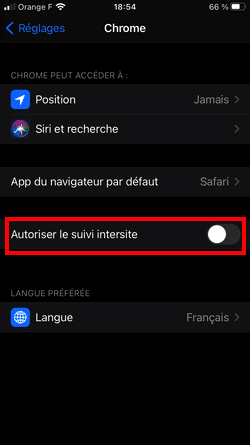
Yes, Chrome on iOS protects you against cross-site tracking, by default! The requirement to use WebKit forces Google to better protect your privacy.
Intelligent Tracking Prevention (ITP) contains numerous mechanisms to combat "cross-site tracking", including:
- Blocking all third-party cookies (planned for 2022 only on Chrome).
- Limiting the lifespan of cookies created via javascript (1st party cookies, but which can be created by third parties) to 7 days.
- Limiting the lifespan of cookies placed via CNAME domains (again, 1st party cookies, but which can be placed by third parties) to 7 days.
ITP protections are not limited to cookies; for an exhaustive list, read Safari's Cookie Status page.
While these protections help combat the worst of advertising (cross-site tracking), they do not prevent marketing companies from measuring each of your interactions on each site, nor from serving ads. Marketing companies also keep working to get around Apple's restrictions (via Server-Side Tagging, or third-party identifiers disguised as first-party ones, for example).
If you want to be better protected, what are your options?
The browser as a surveillance vector in its own right
Before even analyzing how browsers protect you from tracking while you browse: have they set up tracking systems of their own? To find out, I will look at what happens the first time the browser is launched. Note that Brave recently carried out a similar analysis. Here are the steps I followed:
- Downloading the browser to be tested.
- Disabling NextDNS.
- Closing the various running applications.
- Launching Charles Proxy and enabling tracking.
- Launching the browser, then searching in the address bar (no private browsing).
- Exporting the Charles session to my computer for analysis.
And here is a summary of the different browsers tested.
Safari, difficult to audit exhaustively
Safari is pre-installed, so I cannot simulate a first launch. It is not out of the question that Apple collects telemetry data from Safari if you have not turned off the various switches in "Settings" > "Privacy" > "Analytics & Improvements":
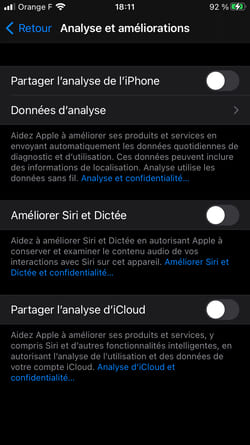
I turned off the various switches in "Analytics & Improvements", so I didn't see any Apple trackers specific to Safari.
When you do a search, the default search engine is Google. Google reportedly pays Apple $12 billion per year to be the default search engine on all Apple devices. Safari thus sends each character entered in the search bar (without identifier) to Google, to enable auto-completion.

On the privacy side, Apple is taking very good initiatives. But it allows Google and its surveillance capitalism to flourish, for big money.
DuckDuckGo, the good student
The American search engine (largely based on Bing) has made privacy its rallying cry, and it is also one of the search engines recommended by PrivacyTools. It also offers an iOS browser; here are the requests sent on first launch:
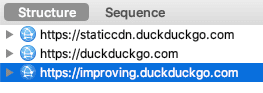
Looking at the details, it's very clean: DuckDuckGo downloads the content blockers. When you type in the address bar, it collects the characters for auto-completion (a benefit of also providing a search engine), without any identifier. Telemetry is on, but again without any identifier.
The only constraint: the default search engine (the one used by the address bar) obviously cannot be changed. But if you are not satisfied for certain queries (reminder: behind DuckDuckGo, it is often Bing), you can use "bangs", aliases that let you search on another engine or site (Google obviously, but also YouTube, Wikipedia, Twitter, etc.).
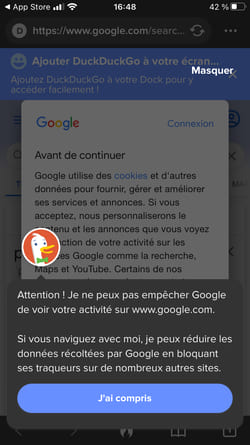
DuckDuckGo does not lack humor, here is the dedicated message during your first Google search (prefixing your search with !g).
Also much appreciated: how easy it is to erase your data:

Just click on the flame to clear the data.
Brave protects you... and runs its own business
The Brave browser was created by Brendan Eich, former co-founder of Firefox and creator of Javascript. Brave has a strong stance against trackers and other advertising that does not respect privacy. Here are some key points:
- Brave is based on Chromium (and its Blink rendering engine), the Open-Source part of Google Chrome. But on iOS, it cannot use Chromium, and is forced to use WebKit.
- Via Brave Shields, it blocks trackers and other advertisements that track you. If you agree, it shows privacy-friendly ads (served locally, which makes Brave an advertising network). This positioning, in competition with publishers (Brave recruits advertisers), has sparked controversy.
- Brave Rewards allows you to pay for the sites you visit in various ways: via a monthly subscription (for example, €10 shared with the sites visited, depending on your time spent on these sites), via tips (micro payments) or via advertising served locally by Brave (for which you can also be paid). Brave Rewards is based on Brave's own cryptocurrency: BAT (or Basic Attention Token).
UPDATE December 15, 2020: Brave has other controversies under its belt (thanks @kinux), and in particular:
- Financing via affiliate links to cryptocurrency sites, a practice stopped after the affair was revealed.
- The inclusion of Infogalactic, a far-right Wikipedia, in the search engines offered by default. The practice reportedly stopped in December 2018 according to this site.
Brave allows you on first launch to choose your default search engine (and allows privacy-friendly search engines such as Qwant, DuckDuckGo or Startpage to find new users):
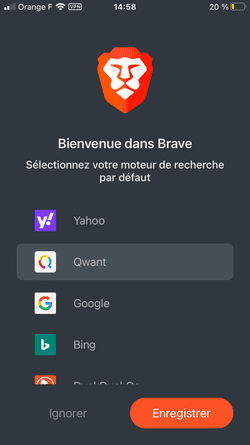
Here I select Startpage, a Google-based search engine that respects privacy.
Let's check the queries before clicking "Save":
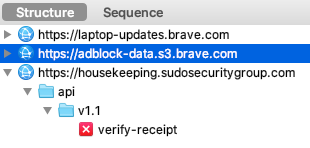
Some requests are not readable in Charles, so I was not able to check whether identifiers were leaking. However, we can note the call to sudosecuritygroup.com. This is actually the company Guardian, which partnered with Brave to provide a VPN that also blocks trackers and ads. You can activate the VPN in Brave, but you will have to pay.
Second step, Brave offers to block trackers:
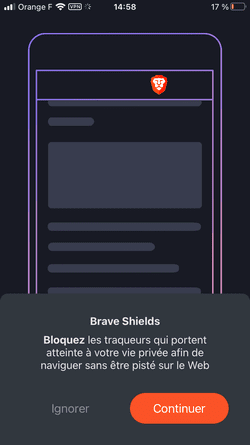
Obviously I accept.
Third step, Brave has its own advertising network in mind and offers to show you “private and anonymous” ads:
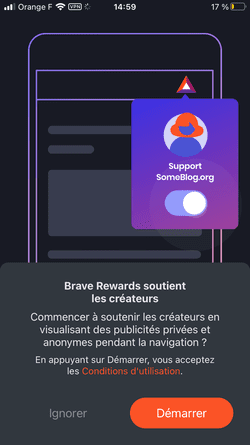
I click Skip, auditing Brave ads will be for another time.
Fourth step, I launch a search. Brave asks me if I want to enable search suggestions:
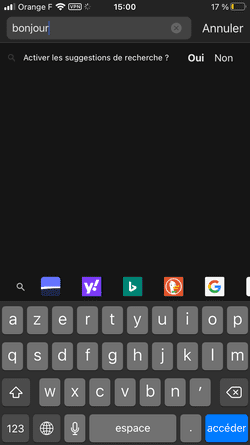
A welcome question, so I decline.
Now let's look at the requests sent (since the application was launched):
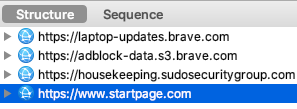
Looking at the details, Brave has not sent any extra requests since step 1, apart from the one to Startpage, which is only called when I submit my search query.
Firefox, some unpleasant surprises
Firefox is my browser on Mac. Unlike Brave, Firefox has its own rendering engine, Gecko. But on iOS, it too is forced to use WebKit. I expected Firefox for iOS to be beyond reproach on privacy, given Firefox's strong reputation and its favorable messaging on the subject. I was surprised:
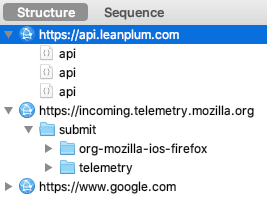
From the first opening, Firefox leaks my personal data to Leanplum, a marketing company that allows targeted messages to be displayed. Leanplum is greedy: it collects, among other things, the deviceId, userId and uuid. It also captures my main interactions with Firefox.
Firefox also collects my main interactions (such as opening the application, closing it, clicking on the address bar) live (via incoming.telemetry.mozilla.org), with the identifier clientId.
For calls to Google, no surprise, it is the default search engine on Firefox. Google represents the main source of revenue for Firefox, with around 450 million dollars per year. Each character entered in the search bar is sent to Google for auto-completion (without identifier).
Is it possible to disable the leak of personal data to Leanplum as well as telemetry? Yes, by unchecking the correct option in the settings:
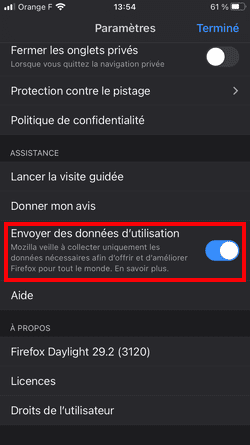
I uncheck “Send usage data”
You would have expected Firefox to make this opt-in, and not to leak personal data to a marketing company.
Chrome, Google's voracious browser
If you use Chrome for iOS, you presumably have no particular expectations when it comes to your privacy. We have already seen, for instance, that Chrome sends a unique HTTP header to every Google and Doubleclick domain, handy for tracking you. Also worth reading: "Why I'm done with Chrome", written two years ago already.
As soon as you open Chrome, Google informs you that you must accept the terms of use. First problem: sending usage statistics and error reports is checked by default:
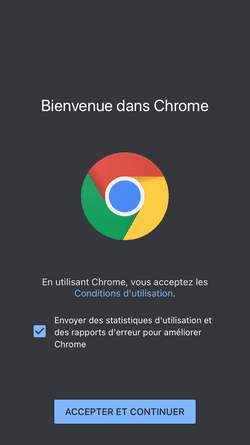
So I uncheck the sending of usage statistics and error reports.
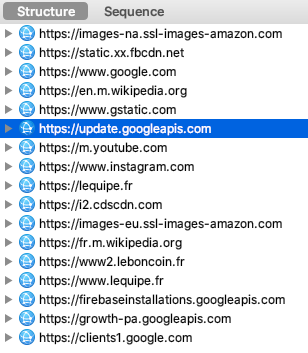
If I look at the requests before clicking on "Accept and continue", I see that Chrome is already calling many sites: don't panic, it is actually loading images for the default bookmarks (I imagine the most visited sites in France). Chrome also retrieves identifiers such as userid.
Second step, and Chrome shows just how greedy it is here: it asks me to sync all of my browsing with my Google account. A massive grab of your personal data, then, which Google sugar-coats by dangling the ability to also sync your passwords across your various devices “and more”.
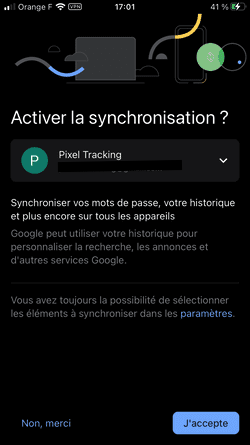
So I click on “No, thank you”.
If you want to select which items to sync, the blue "settings" text might trick you into thinking you already have control, but it's not clickable. Note again the blue “I accept” button, very natural compared to “No, thank you” in black: a good example of a “Dark Pattern”.
Third step, Chrome continues its momentum and asks me to access my exact location (to "Improve my experience")!
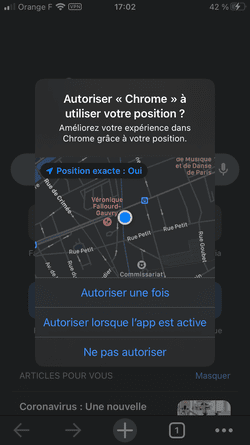
I click on "Do not allow"
Note that with iOS, I can now grant access just once (Chrome will then have to ask me again on the next launch), and I can also turn off "Precise Location". These options can be useful for protecting yourself from certain apps.
Last step, Chrome is already launched, but I do a search, on Google obviously, and come across a consent banner that has just been sanctioned by the CNIL:
The new information banner implemented by the companies upon arrival on the google.fr page still did not allow users residing in France to understand the purposes for which cookies are used and did not inform them of the fact that they could refuse these cookies.
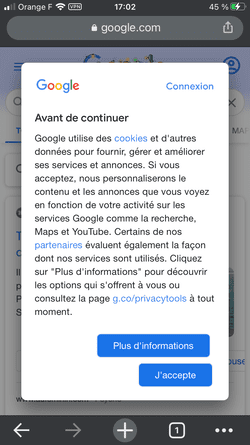
And indeed, good luck refusing cookies, you can get lost in the menus without finding the option, or even being sure that the option chosen actually allows you to refuse cookies (I won't go into detail, that would deserve a dedicated article).
At this point you might think: I haven't clicked "I accept" yet, so Google can't have placed any cookies. All the more so since, if you read the latest CNIL sanction against Google (dated December 10, 2020), Google used to do exactly that but has since corrected course:
The restricted committee noted that, since an update in September 2020, the companies had stopped automatically placing advertising cookies as soon as the user arrives on the google.fr page.
However, let's look at the requests sent (since step 2):
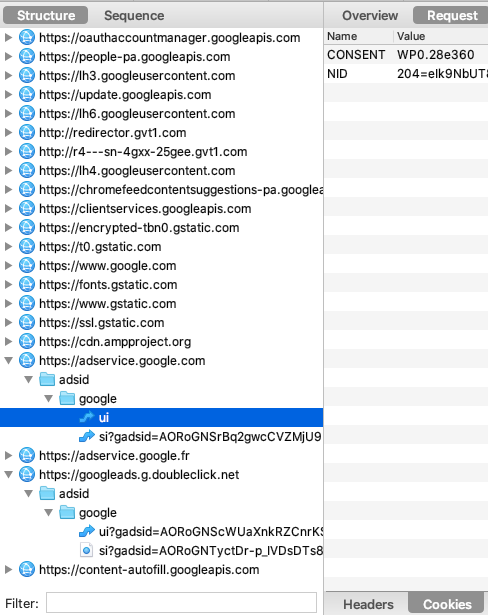
Among the numerous requests sent to the various Google services, we can note the requests to adservice.google.com and to doubleclick.net. The request to adservice.google.com does contain the NID cookie. What is this cookie for? According to Google's own words:
We use cookies, such as "NID" and "SID", to personalize ads on Google sites, such as Google Search. For example, we use them to remember your most recent searches, your previous interactions with an advertiser's search results or ads, and your visits to an advertiser's website. This allows us to show you personalized ads on Google.
Does the CNIL mention the NID cookie in its deliberation?
The restricted committee notes that the company GIL indicated in its letter of April 30, 2020 that four of the seven cookies placed, namely the NID, IDE, ANID and 1P_JAR cookies, pursue an advertising purpose.
Thus, in contradiction with the CNIL's deliberation, Google has not stopped automatically placing certain advertising cookies on the google.fr page.
Edge does even worse than Chrome
Microsoft browsers' reputation speaks for itself:
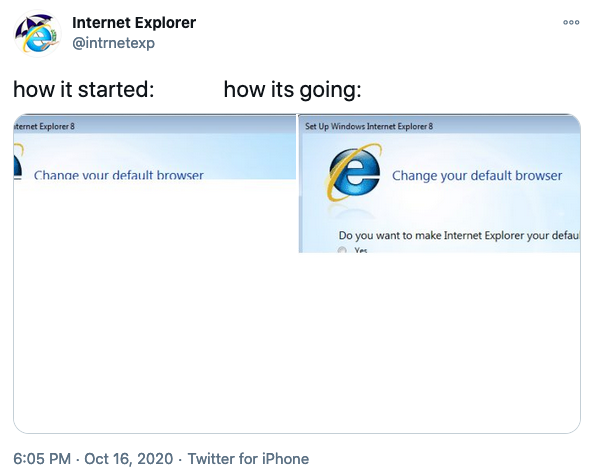
Via Twitter parody account @intrnetexp.
But no more jokes about Internet Explorer being late: Microsoft now relies on Chromium and its Blink rendering engine for the Edge browser (just like Brave, Opera or Vivaldi), and is investing to make it competitive. For Edge too, there is no Chromium on iOS due to Apple restrictions, and therefore WebKit is mandatory. What about privacy?
The first launch of Edge looks a lot like Chrome, which is not a good sign. Edge suggests you sign in to enable syncing: bookmarks, passwords and "much more."
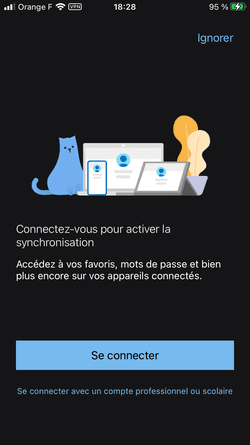
I click on “Ignore” (note the Dark Pattern).
If we look at the requests sent before clicking on "Ignore", Edge is already greedy:
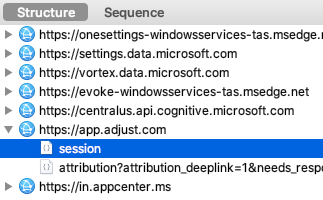
Via several requests, Edge retrieves several identifiers such as deviceId or clientId. Note in particular the domain vortex.data.microsoft.com, so well named. Each time you interact with Edge, it will collect data, and this leak is impossible to deactivate.
Like Firefox, Edge also leaks your personal data to a third party, Adjust, a company specializing in mobile measurement and attribution. Adjust retrieves identifiers such as persistent_ios_uuid.
Second step, Edge is still as greedy as Chrome: it wants to save my browsing history:
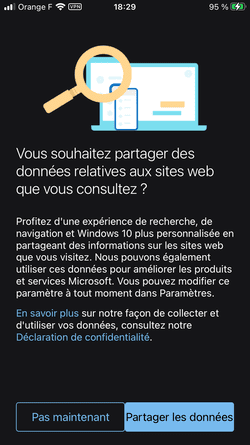
I click on “Not now”.
Third step, we don't quite understand the difference with the previous step ("Find out more" always redirects to the page "Windows 10 activity history and privacy"), Edge insists by asking you for data on "how you use the browser":
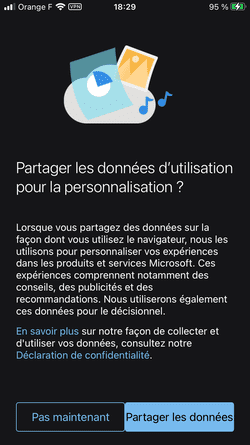
I click “Not Now” again.
Fourth step, I do a search (on Bing obviously), note the consent banner:
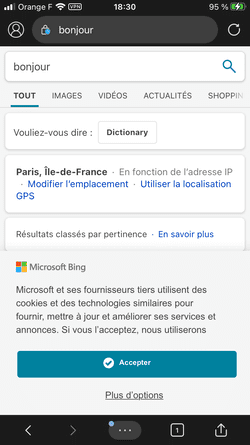
Let's check the requests (I haven't interacted with the consent banner yet):
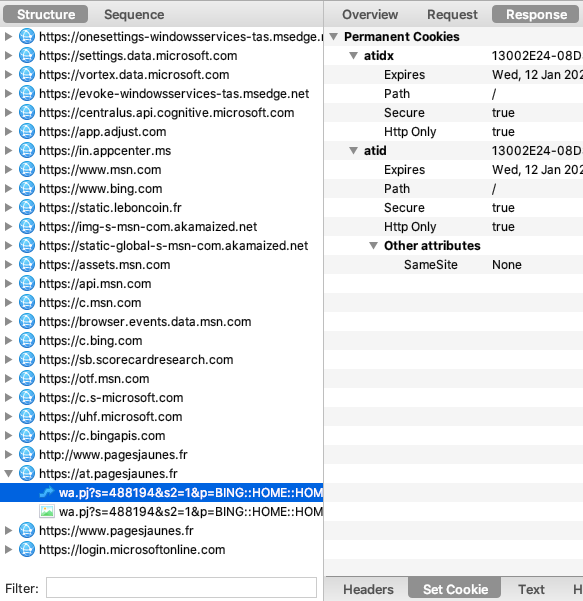
Microsoft services are omnipresent, all collect your personal data. Leboncoin is called but simply to download the logo. Edge leaks your personal data not only to Adjust but also to Comscore (via scorecardresearch.com), a marketing giant that can then build a better profile of you.
Bonus: Bing leaks your searches to the Yellow Pages site
Because of Bing (and not Edge), I was surprised (and alarmed) to see that it leaks potentially sensitive data, my query, directly to Pages Jaunes (via pagesjaunes.fr):
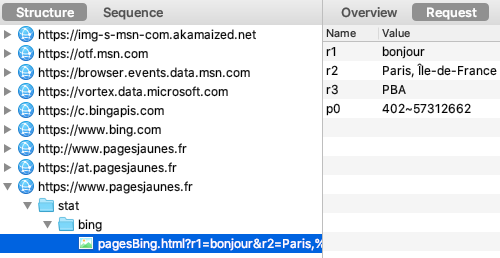
Fortunately my "hello" search was not sensitive, but Bing leaks all of your searches to the Yellow Pages site (as well as your city), in real time, whatever the device and browser used.
The advertising agency of Yellow Pages is called Solocal. This seems to be an old partnership, surely renewed, at the expense of your privacy (reminder: I still have not interacted with the consent banner, and my Bing search leaked to the Yellow Pages site).
An added bonus from Bing and Yellow Pages: the domain at.pagesjaunes.fr (which sets a cookie without your consent) is a CNAME alias pointing to the French analytics tool AT Internet:
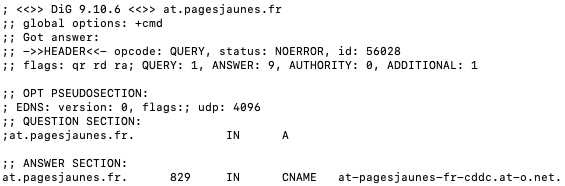
As we have already seen with Criteo, Boursorama or Lemonde.fr, these CNAME aliases are intended to bypass browser protections and ad blockers; they are also often the cause of a significant security vulnerability.
Does clicking on “More options” and then disabling “non-essential” cookies prevent your queries to Yellow Pages and your browsing data from being leaked to AT Internet?
The consent banner without first level option to refuse everything, a classic.
Unfortunately no, this changes nothing in Bing's behavior: it still leaks my searches to the Yellow Pages site.
One key piece of information was still missing for Microsoft: my location! And sure enough, before I even continue browsing, Edge now asks me for access to my location:
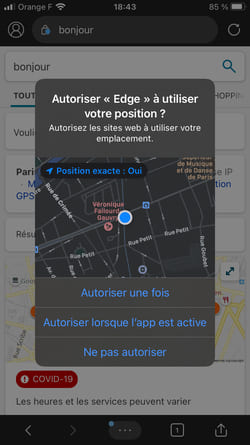
Conclusion: hard to believe, but with Edge and Bing, Microsoft pulls off the remarkable feat of being worse than Google when it comes to respecting your privacy.
The browser as protection against site surveillance
While browsers themselves respect your privacy more or less well, they are also supposed to protect you when you browse the web. Let's see if this is really the case, by browsing two sites known for massively leaking your personal data:
- Le Bon Coin, cf. "The big sale of your personal data on Le Bon Coin".
- Le Monde, see "Consent: the worst user experience and surveillance with Lemonde.fr".
The protocol will be the same for all browsers:
- Deleting cookies and other browser data.
- Disabling NextDNS.
- Closing the various running applications.
- Launching Charles Proxy and enabling tracking.
- Launching the browser to be tested, no private browsing.
- Browsing the home page of these 2 sites, accepting tracking via the consent banner.
The comparison cannot be perfect because it covers only 2 home pages, and from one moment to the next, the advertisements served may differ. But the number of trackers should give us a good idea of the browser's effectiveness.
Safari without a content blocker: everything gets through
The baseline case: I turned off my content blocker, Firefox Focus. Here are the condensed results:
- 94 hosts contacted.
- 338 requests.
- 9.2 MB of data downloaded.
Needless to say, the number of trackers is impressive, even if Intelligent Tracking Prevention limits the damage by stopping cross-site tracking.
Safari with a content blocker: significant gaps remain
Here I used Firefox Focus (whose tracker list is provided by Disconnect); you can also select other content blockers like Adguard. Are the results better? Noticeably:
- 45 hosts contacted (which means 49 fewer trackers).
- 200 requests.
- 6.2 MB of data downloaded.
Does this mean that the content blocker has completely protected you? When you look in detail, many third parties continue to track you, even if the most "obvious" trackers have disappeared:
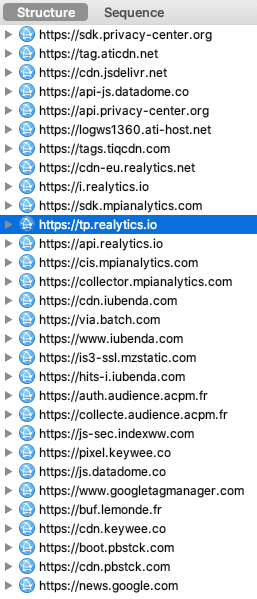
I deleted the 1st party requests to see more clearly.
DuckDuckGo, improved protection
DuckDuckGo uses its own list of trackers, "Tracker Radar", generated by its own web crawl. The “Tracker Radar” information on the different trackers can also be used by third parties (as in Safari, to provide information on these trackers). Here are the results:
- 39 hosts contacted.
- 226 requests.
- 6.3 MB of data downloaded.
These statistics seem close to Safari with content blocker, if we now look at the details:
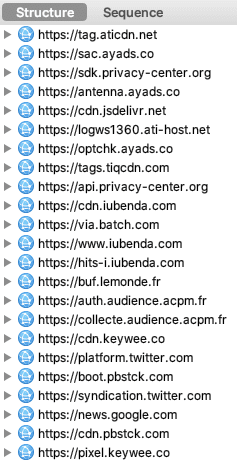
The list of trackers is shorter, DuckDuckGo is a little more efficient than Safari combined with Firefox Focus.
Brave, strong protection
Brave Shields, the tracker-blocking system, is very flexible:
- The default settings keep you well protected.
- You can change the default settings.
- You can also change settings for specific sites.
So here are the default settings:
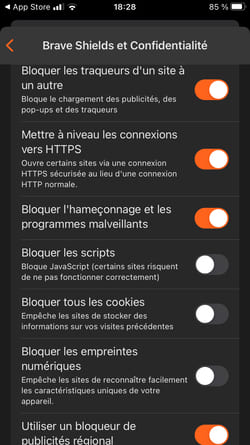
You can decide to block scripts, all cookies and digital fingerprinting. But from experience, some sites will no longer work correctly. Here are the results with the default settings:
- 29 hosts contacted.
- 168 requests.
- 5.4 MB of data downloaded.
Brave is therefore the most effective. If we look in detail:
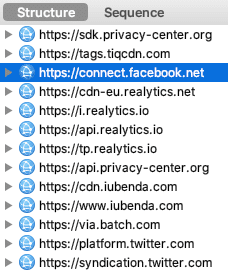
It's almost perfect (Brave protects, for example, against CNAME cloaking of AT Internet on the website lemonde.fr, via the domain buf.lemonde.fr), but Brave notably misses Facebook and Twitter.
Firefox protects you relatively poorly by default
While Firefox is a very good option on my Mac, it has a severe limitation on iOS: as with all other iOS browsers, you cannot install extensions. And Firefox without an extension unfortunately protects you much less well. Here are the results with the default settings:
- 111 hosts contacted.
- 454 requests.
- 11.9 MB of data downloaded.
So you are tracked extensively. That said, it's not all bad if you go into the settings:
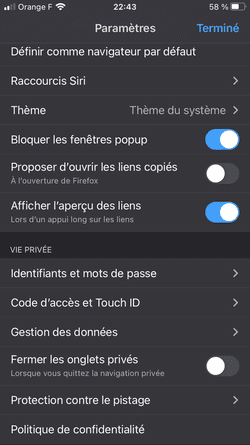
In the “privacy” section, click “Protection against tracking”.
You can see that by default, Firefox applies the "Enhanced protection against tracking" (ETP for "Enhanced Tracking Protection") in "Standard" version:
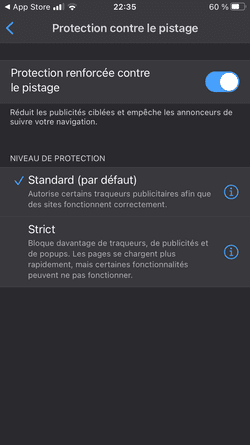
By clicking on the "i", you can learn that Firefox protects you against social network trackers (in fact, Facebook and Twitter have been blocked), cross-site trackers (nothing new here, you already have this via ITP), cryptocurrency miners and digital fingerprinting detectors (a technique commonly called "fingerprinting").
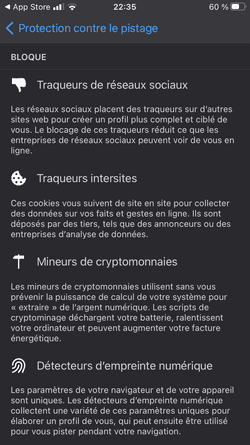
If you activate "Strict" protection, Firefox will also protect you against "Content used for tracking" (protection which is of particular interest to us):
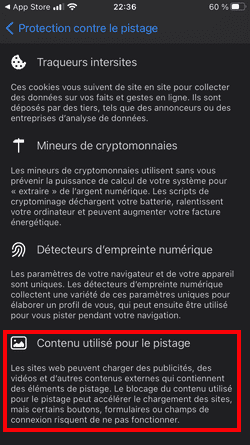
Are you better protected? Here are the new results:
- 42 hosts contacted.
- 225 requests.
- 6.7 MB of data downloaded.
The results are therefore much better. If we look at the detail:
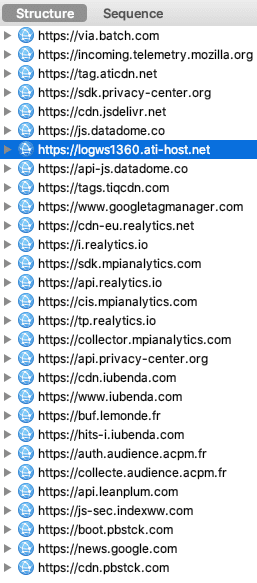
We find the same trackers as with the Safari and Firefox Focus option: the 2 Mozilla apps use a list provided by Disconnect to block certain trackers.
Chrome, the browser without protection
With Chrome it's very simple: you have no default protection, nor any settings that let you protect yourself. Chrome is not entirely idle, though; its teams are working on the Privacy Sandbox project, whose mission is:
The Privacy Sandbox project’s mission is to “Create a thriving web ecosystem that is respectful of users and private by default.”
In detail, "a thriving web ecosystem" means supporting current advertising use cases: conversion measurement, behavioral advertising, retargeting, etc. "Private by default" means no longer allowing trackers to track users individually (Chrome will block third-party cookies in 2022).
Measurement and targeting will be done via "cohorts" of users (sufficiently large groups), via decisions made directly by the browser, via mechanisms to prevent data cross-referencing, etc.
Obviously Google is less affected by Chrome's changes than an average website: it will continue to track the vast majority of users via their Google accounts.
Here are the results of browsing on Chrome:
- 100 hosts contacted.
- 370 requests.
- 11.3 MB of data downloaded.
No surprise then, you are not protected at all.
Edge, well-hidden protections
Edge was dead last when the browser first launched. What about protection while browsing? If we look at the results with the default configuration:
- 96 hosts contacted.
- 368 requests.
- 10.2 MB of data downloaded.
Edge is comparable to Chrome, which is not a compliment. But Edge has some interesting hidden options. If you go to “Settings”, then “Content blockers”, you can discover a “native” integration of the Adblock Plus blocker:

So I activate “Block ads”
Yes, Edge has integrated Adblock Plus into its browser. However, Adblock Plus is also an advertising company, which gets paid large sums by marketing giants (including Microsoft, but also Google, Amazon, Criteo, Taboola or Outbrain) to let certain ads through: a fine hypocrisy. You must therefore go further to block all ads, namely go to the “Advanced settings” of “Content blockers”:
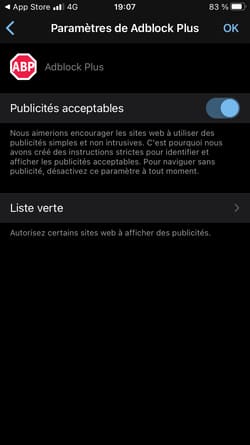
I disable “Acceptable Ads”.
But you are not done yet! Another option is useful: it is in "Settings", "Privacy and security", and in the Security section (!) you will find the item "Tracking prevention" (apparently already "Enabled"):
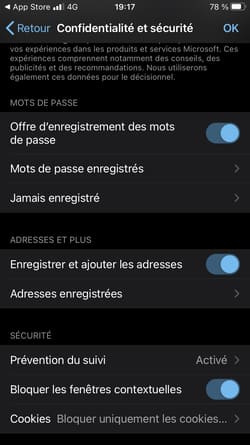
Here you need to click on “Tracking Prevention”.
You then access a new screen:
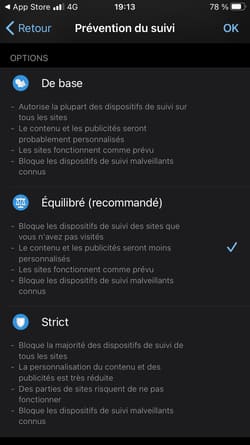
The "Balanced (recommended)" version is selected by default. So Edge would already block “trackers from sites you haven’t visited”, as well as “known malicious trackers”. In fact, we wonder what Edge is really blocking, all trackers are invited to the party (Criteo, Google, Doubleclick, Weborama, Facebook, Amazon, etc.).
Microsoft says it relies on Disconnect to block trackers, starting with the "Balanced" version of "Tracking Prevention"; this looks more like a PR move (Firefox also relies on Disconnect, yet blocks far more trackers).
Does switching to “Strict Tracking Prevention”, activating Adblock Plus and deactivating “Acceptable Ads” allow you to be protected against all trackers? Given the effort involved, we would like it. Here are the results:
- 41 hosts contacted.
- 200 requests.
- 6.8 MB of data downloaded.
Edge rises to the level of Safari with Firefox Focus (which is the least it could do with Adblock Plus activated and Disconnect). If we now look in detail:
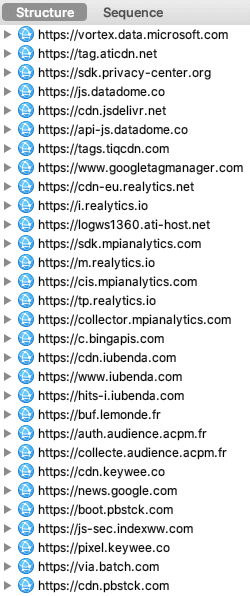
We can clearly see that Edge still has progress to make.
NextDNS, to back up your browser
To wrap up: the choice of browser is a personal one, but some iOS browsers provide a good first line of protection: I am thinking in particular of DuckDuckGo. NextDNS can be used on top of it.
I usually use the Safari + Firefox Focus combo (though DuckDuckGo and Brave are tempting); NextDNS then blocks the trackers that have slipped through the cracks. Here is the result on the same combined LeBonCoin and Lemonde.fr test:
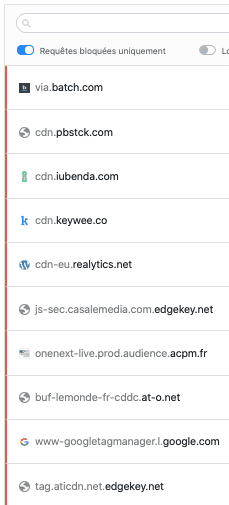
Trackers that the Safari + Firefox Focus combo couldn't block were blocked by NextDNS.
In short, your choice of browser and any extra protections can make a big difference!