Chrome and privacy
Chrome is an excellent browser, but it is not the best defender of your privacy.
Unlike Firefox, which has implemented Enhanced Tracking Protection to block most trackers, or Safari, which has improved tracker blocking through its Intelligent Tracking Prevention feature, Chrome does not do much. Chrome will block some cookies starting with version 80 (an explanation of the SameSite cookie attribute, and how Chrome will change the way it handles them, is available here), but advertisers will only need to mark their cookies with the SameSite=None attribute and nothing will change.
While running tests for the article on the de-anonymization of browsing data collected by DoubleClick, I noticed another problem: Chrome was systematically sending the same custom HTTP header, named x-client-data, to Google and DoubleClick.
The test
We are going to observe this custom header, which Chrome sends only to DoubleClick (Google's advertising service) and Google domains. Let's look first at DoubleClick, a service used by lemonde.fr.
- Disable your ad blocker
- Delete cookies in Chrome (Settings > Advanced settings > Clear browsing data), so you are signed out of your Google account
- Then go to lemonde.fr
- Open the Chrome console (⌘+Option+J on Mac, Ctrl, Shift and J on PC)
- Go to the "Network" tab and filter the results for doubleclick
- Scroll down the page (lemonde.fr considers scrolling to count as cookie acceptance, and then triggers advertising tracking)
- In the console's "Network" tab, click a request sent to doubleclick and look at the "Request headers"
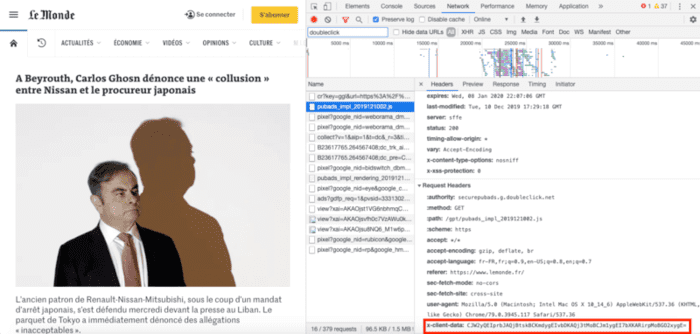
You will see a Chrome-specific header appear, sent to the DoubleClick domain: x-client-data.
The second step of the test is as follows:
- Go to google.com
- Open the Chrome console (⌘+Option+J on Mac, Ctrl, Shift and J on PC)
- Go to the "Network" tab and filter the results for google.fr
- Refresh the page, then in the console's "Network" tab, click a request sent to Google and look at the "Request headers"
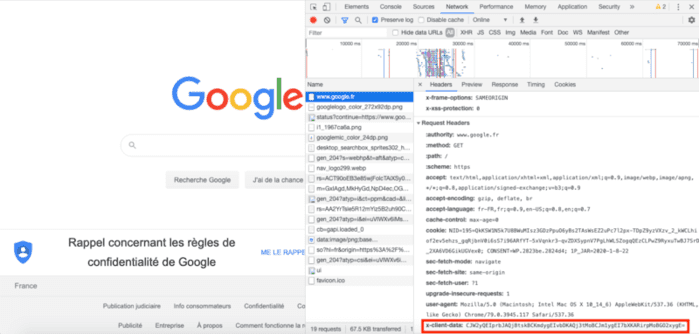
You will still see the same header: x-client-data, filled with the same value. Through Chrome, Google can therefore track you across all domains that use Google or DoubleClick services (a large part of the web), even if you block cookies.
What is the purpose of the x-client-data header?
After this discovery, I tried to learn more about it on the web. It turns out that this header has received very little attention: no articles in French and only two articles in English.
- More on Chromium updates and headers, written by Vincent Toubiana, a French IT expert at the CNIL
- Google Chrome variations Fingerprinting
Vincent Toubiana points to the Chrome whitepaper as the only source of information from Google, so here is the official information about this header:
We want to build features that users want, so a subset of users may get a sneak peek at new functionality being tested before it’s launched to the world at large. A list of field trials that are currently active on your installation of Chrome will be included in all requests sent to Google. This Chrome-Variations header (X-Client-Data) will not contain any personally identifiable information, and will only describe the state of the installation of Chrome itself, including active variations, as well as server-side experiments that may affect the installation.
The variations active for a given installation are determined by a seed number which is randomly selected on first run. If usage statistics and crash reports are disabled, this number is chosen between 0 and 7999 (13 bits of entropy). If you would like to reset your variations seed, run Chrome with the command line flag “--reset-variation-state”. Experiments may be further limited by country (determined by your IP address), operating system, Chrome version and other parameters.
So this header is indeed sent in every request to Google. It is used for A/B testing, but also for Chrome usage statistics. Here again, you have to trust Google not to use your header to track you more effectively.
Can you escape it?
Quite simply, you can avoid using Chrome and turn to a more privacy-friendly browser such as Firefox, Safari or Brave. If you use Chrome, this header is not sent when you are in Incognito mode. You can also disable the sending of usage statistics and crash reports to Chrome in order to reduce the entropy of the header.