Advertising, a marginal part of Spotify's revenue
Spotify runs on a "freemium" model: you can use the music streaming service for free ("Spotify Free"), but with limitations and advertising. The free version is a loss leader for the paid one.
If we look at the financial results for the last quarter of 2019, “Spotify Free” users represent 56% of all users, but only 11% of Spotify’s revenue.
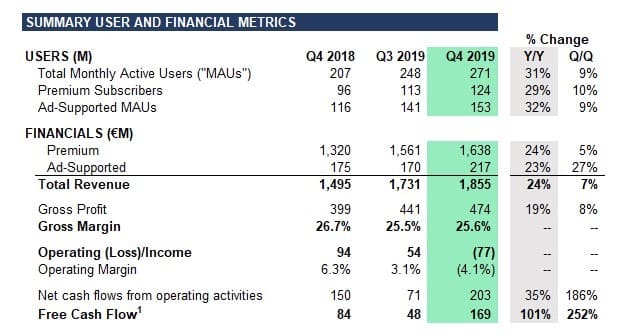
Yet Spotify is aggressively selling its “Free” users
While advertising represents a marginal part of Spotify's revenue, that does not stop it from using programmatic, the method of selling ad inventory that is least respectful of privacy (see Brave's explainer page on this). Spotify is even ramping up its advertising business, says Julie Clark, head of programmatic advertising at Spotify:
[...] With that said, we still saw double digit rates of growth across each of our Direct, Programmatic, and Ad Studio channels. During Q4 we introduced Dynamic Ad Breaks (“DAB”) in the US and UK which added significant sellable inventory. We plan to expand this capability into 10 more markets in Q1 and will continue to scale these capabilities as content becomes increasingly available over our total geographic footprint.
Moreover, as Pat Walshe notes in this excellent Twitter thread, on its advertiser site Spotify boasts of knowing your tastes, your moods and your online behavior very well, and even of revealing your offline behavior:
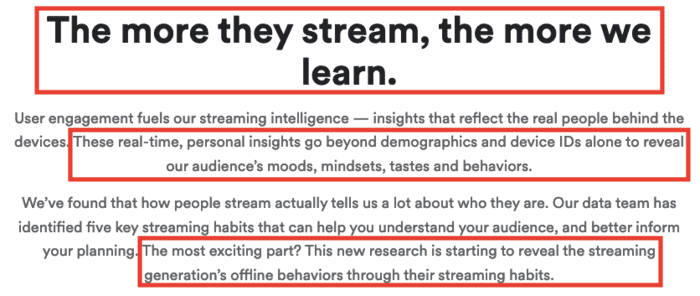
So what are these “key” listening habits that let Spotify profile you more precisely, and so sell you more effectively to brands?
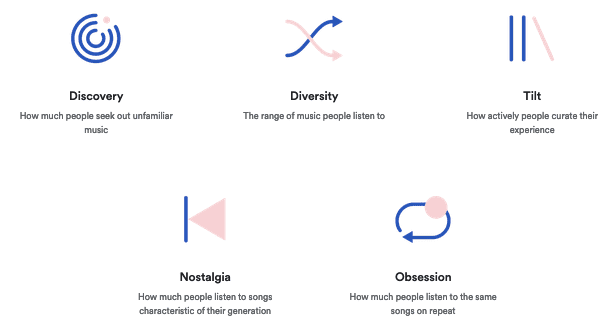
To profile you, Spotify also uses third-party data:

Since Spotify is already particularly good at analyzing your behavior and serving up recommendations (as your Discover Weekly playlist shows), we can trust it to apply that science to behavioral advertising, leaking its “Free” users' personal data to third-party advertisers in the process.
But as a Spotify Premium subscriber, and therefore free of ads, I did not expect to be tracked by third parties.
Spotify for iOS leaks my personal data
Here are the steps I followed to observe whether the Spotify iOS app leaked my personal data:
- Close the various apps running in the background.
- Launch the Charles Proxy app and start capturing traffic.
- Launch the Spotify app (logged in, with a Premium subscription), then listen to some music.
- Export the logs from my Charles Proxy session to my computer.
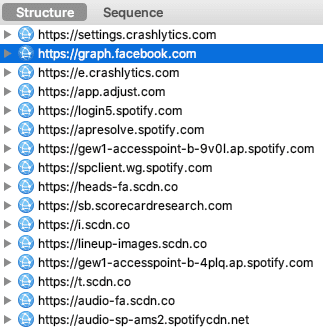
Surprise: Spotify Premium does call third parties:
- Google: omnipresent. Here Spotify calls Crashlytics (crash reports), a tool bought from Twitter in 2017 and folded into its developer toolkit, Firebase. While calling a Google service is debatable, a crash reporting tool makes sense, even for a paid app.
- Facebook: omnipresent. Facebook also provides its developer toolkit. This integration does not seem to leak any specific personal information (I see a plain call to Facebook, with no additional identifier). Still, what is the point? I log in to Spotify with my email address and not through Facebook, so Spotify should have no reason to call Facebook.
- Adjust: a mobile marketing company offering several services, including analytics, attribution (which ad campaign led to the Spotify install) and ad retargeting. I clearly don't pay Spotify to have this kind of company track me.
- Comscore: via scorecardresearch.com, a company specializing in market research. Here too, I am profiled without having given my consent.
One note on Facebook: I do not have an account, and I had already disabled "Facebook Data" in the Spotify privacy settings:
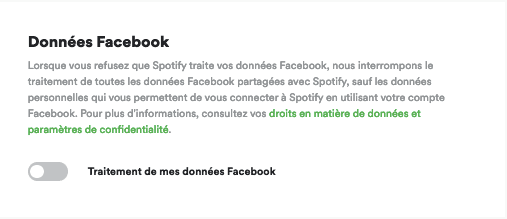
And yet, Spotify continues to call Facebook.
How can you avoid this tracking? Since Spotify offers no opt-out for its iOS app (more on this further down in the article), you will have to resort to more elaborate solutions such as DNSCloak, Adguard or NextDNS.
Spotify for Mac, hooked on Google's advertising solutions
Now let's see whether Spotify's Mac client also leaks personal data to advertising companies. To do so, I followed the same steps but with the Charles Proxy app for Mac:
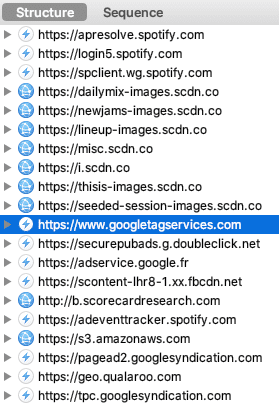
So Spotify sends your personal data on the Mac app too, to these third parties:
- Google: across multiple domains, Spotify uses Google Ad Manager to monetize its ad inventory. The problem: I use the Premium version of Spotify, so I get no ads. Why is Spotify leaking my personal data to Google's advertising solution?
- Comscore: via scorecardresearch.com, this tracker is already present on the iOS app, and it turns up on the Mac app too.
- Qualaroo: a user feedback tool, which lets Spotify segment its users so it can send surveys to only some of them. This company therefore collects your profile and your Spotify usage. Note that it is responsible for the call to Amazon (it hosts its JavaScript library on AWS, via the domain s3.amazonaws.com).
If we zoom in on the information sent to Google Ad Manager during the ad call (the https://securepubads.g.doubleclick.net/gampad/ads? request), we see that Spotify leaks quite a bit of information to Google, including:
- Your Doubleclick advertising identifier, via the “IDE” cookie. It follows you across the internet and, thanks to Spotify, even into desktop apps.
- Your age.
- Your gender.
- The Spotify advertising ID: aduserid.
- Your listening playlist: Discover Weekly, etc.
- The artist listened to (encoded): artist.
- Your Spotify plan: here Spotify Premium.
How can you avoid this tracking? Since Spotify offers no real opt-out on its Mac app (more on this further down in the article), you will have to resort to elaborate solutions such as a Pi-hole or Adguard.
On the web player, the Wild West
I do not use the web player day to day, preferring the Mac app, but I wanted to see how much tracking there was on the web. Even before I logged in, Spotify's use of trackers was already massive:
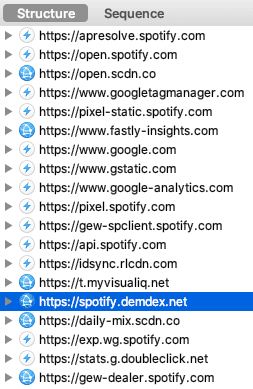
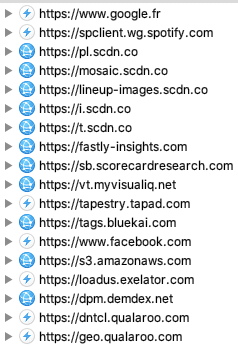
The companies collecting your personal data thanks to Spotify are many; it's a veritable who's who of surveillance marketing:
- Google: Spotify is hooked on Google's solutions and here uses Google Tag Manager, Google Analytics and Google reCaptcha.
- TowerData: via rlcdn.com, aka Rapleaf, a company that made a name for itself in 2010 by harvesting Facebook users' information without restraint and reselling the enriched identities (well before the Cambridge Analytica scandal). Rapleaf was acquired in 2013 by TowerData, a huge data provider that probably knows you very well.
- Nielsen: via myvisualiq.net, aka VisualIQ, an attribution service (which lets Spotify work out which ad campaigns are most effective) acquired by market research giant Nielsen in 2017. Nielsen also tracks you via exelator.com, aka eXelate, a data provider acquired in 2015.
- Adobe: via demdex.net, aka Demdex, the Data Management Platform acquired by Adobe in 2011. Through successive acquisitions, Adobe is now a giant not only in creative tools (Photoshop, InDesign, Lightroom, etc.) but also in marketing.
- Comscore: via scorecardresearch.com. This tracker is everywhere: after the iOS and Mac apps, here it is on the web player.
- Tapad: this data provider also knows you very well; it can tie together the various devices you use (smartphone, computer, etc.).
- Oracle: via bluekai.com, aka BlueKai, a Data Management Platform acquired by Oracle in 2014. You thought of Oracle as SQL? Oracle has changed. Like Adobe, Oracle has diversified through successive acquisitions and now offers businesses a “Marketing Cloud”.
- Facebook: impossible to escape. Facebook is not called here directly by Spotify but by Visual IQ (aka Nielsen); Facebook and Nielsen have an agreement to share your personal data.
- Qualaroo: the user feedback tool already seen on the Mac app.
The catch is that you cannot listen to music without being logged in. Will Spotify rein in the trackers when I log in, given my Premium subscription? Let's look at the trackers sent once logged in:
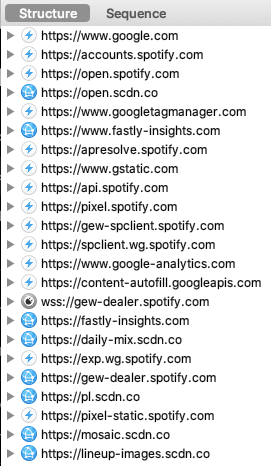
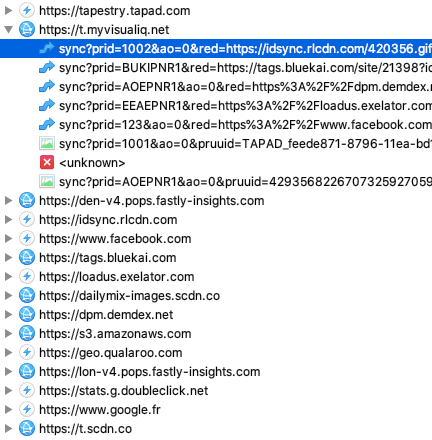
No such luck: Spotify does not limit tracking, even if you are a Premium subscriber! And this time the identifiers are tied to your Spotify account, which makes them all the more valuable to these marketing companies, which can then recognize you, follow you on your computer and link you to your other devices. A special mention for Nielsen, which via Visual IQ syncs your identifier with several other Data Providers (boxed in red): TowerData, Oracle, Adobe, Facebook and Tapad!
How can you avoid this tracking? Since Spotify provides no opt-out for the web (more on this further down in the article), a reasonable solution is to use an ad-blocker such as uBlock Origin (Firefox extension or Chrome).
A chatty but too vague privacy policy
If we now read Spotify's privacy policy, in section 6 Spotify states why it processes your personal data:
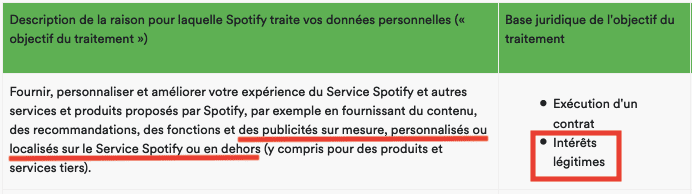
Spotify therefore relies on legitimate interest to serve you personalized advertising, in breach of the GDPR. If we now turn to section 7 to find out which companies Spotify shares your personal data with:
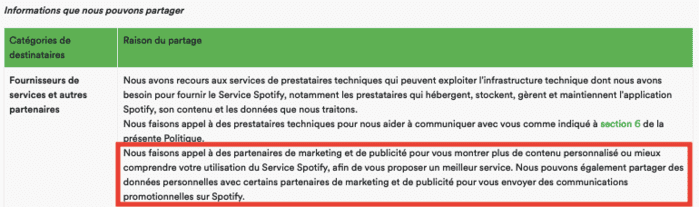
The information, buried in a long privacy policy, is incredibly vague: who are these recipients? What exactly do they do with your personal data? For instance, Spotify should have spelled out why it calls Facebook and leaks your personal data to Google.
Spotify also has a nice "Privacy Center", but this page gets us no further on advertising, the only mention being:
We collect and use your personal data for the following reasons: [...] To provide you with features, information, advertising or other content based on your specific location.
A masquerade of control over personal data
To find out whether it is possible to disable tracking, I first checked the "Privacy Center", which simply redirected me to my account's "Privacy Settings" page.
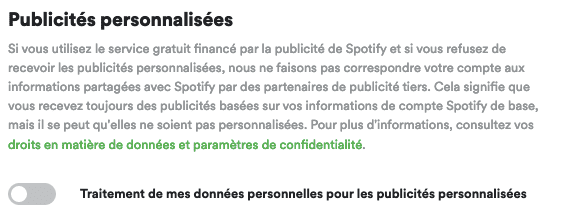
Except that this page only lets me opt out of the processing of my Facebook data (on by default — so much for consent) and opt out of personalized advertising (also on by default, but of no use to me since I get no ads on the Premium version):
Spotify also has a “cookie policy” page. For mobile, Spotify mentions the option of limiting ad tracking via iOS:
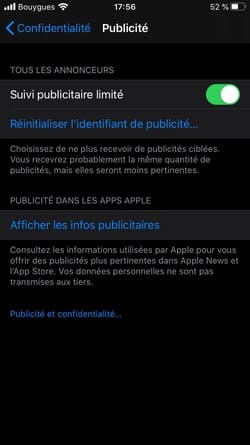
For example, you can use the “Limit ad tracking” setting (on iOS devices)
No such luck: I have already enabled this setting (which therefore does not have the advertised effect):
Spotify also mentions the option of blocking cookies on the desktop application (the Mac app, that is):
You can withdraw your consent to the use of cookies on the Spotify desktop app at any time. If you no longer wish to receive cookies, go to the Account Settings page and enable the opt-out of desktop cookies feature. When enabled, it blocks cookies from installing the Spotify desktop app on this computer. [...] Choosing to block cookies on the Spotify desktop application may harm your Spotify experience.
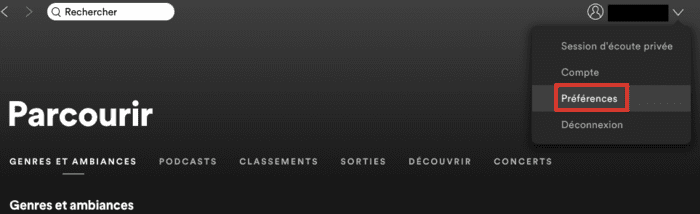
So I could withdraw consent I never gave (though doing so might harm my Spotify experience, without my knowing why). After yet more digging, it turns out you should not go to the “Account Settings” page, but to “Preferences”:
And there, you have to scroll and find “Show advanced settings”:
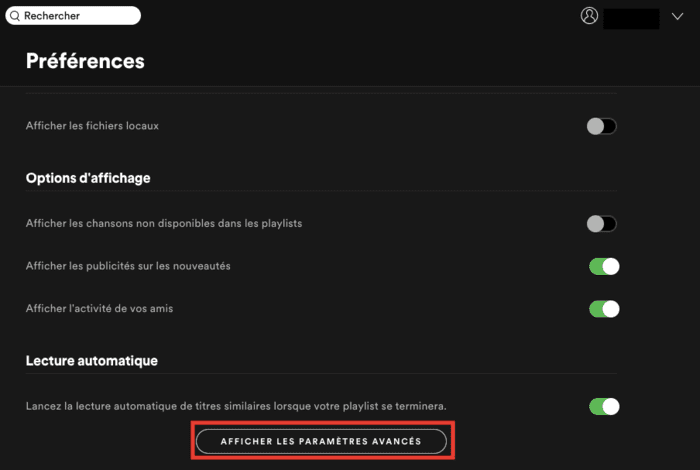
Then scroll again, all the way to the bottom, to find, well hidden, “Privacy” and this gem of a “Dark Pattern":
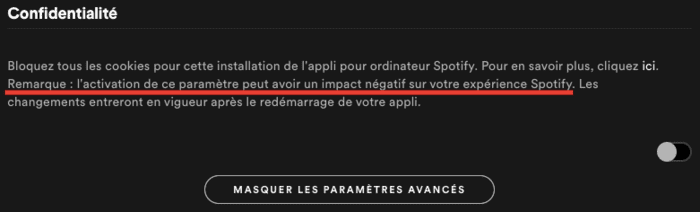
The setting is unchecked, so you might think tracking is disabled (as it is for Facebook and personalized ads). Wrong! You have to check the setting to block cookies. And Spotify is there to scare you, warning that enabling the setting can have a negative impact on the Spotify experience... What "negative impact"? No details.
So I checked the setting and restarted Spotify to gauge the "impact" — unfortunately, the trackers are still there:
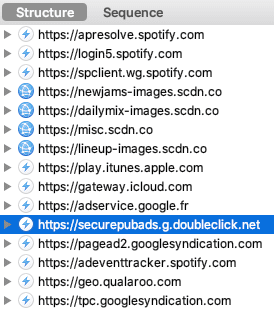
In particular, while it no longer sets the IDE cookie via doubleclick.net, Google keeps receiving all your other personal information, including the Spotify advertising identifier aduserid, which has stayed the same. Spotify is taking you for a fool: it stops Google from setting its IDE cookie, but then lets it identify you via the Spotify identifier (even more invasive, since this identifier lets Google recognize you whatever your device).
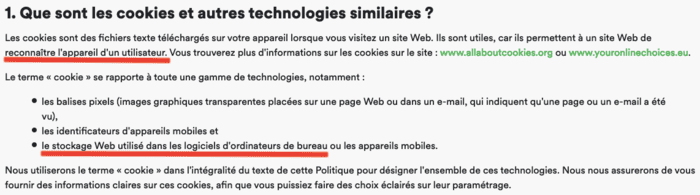
Yet the Spotify advertising identifier should be blocked, according to Spotify's own definition of cookies:
Spotify also has a very special relationship with Google, and not just for advertising: Spotify has chosen to migrate its infrastructure to Google Cloud, which gives Google Cloud Platform a nice case study in its fight against Amazon AWS and Microsoft Azure.
What action against Spotify?
A complaint is already underway with the Swedish data protection authority, concerning the right of access to personal data (article 15 of the GDPR). But no action has yet been taken over the personal data leak, even though there would be ample grounds to open an investigation:
- Spotify leaks your personal data to third parties without first obtaining your consent.
- In particular, Spotify leaks your personal data to Google and Facebook.
- Spotify's web player leaks your personal data to the who's who of surveillance marketing.
- Spotify provides no opt-out at all on its iOS app.
- The opt-out Spotify provides on its Mac app is clearly a "Dark Pattern" and does not work.
- The privacy policy relies on legitimate interest for personalized advertising, and therefore does not comply with the GDPR.
- The cookie information page gives false information, since Spotify does not provide the controls needed to refuse cookies.
And all this even if you pay for a Spotify subscription!